15 common system design interview mistakes
A practical guide to common system design interview mistakes, organized by category, with concrete examples and fixes.
TL;DR
- A frequent interview failure is not wrong architecture but wrong process: jumping to components before requirements, designing silently, or spending 15 minutes on estimation math.
- Over-engineering can be as harmful as under-engineering. Adding Kafka, CQRS, and event sourcing to a system with an illustrative 100 req/sec workload is a red flag unless a requirement justifies the complexity.
- The interviewer is evaluating how you think, not only what you know. Saying "I don't know, but here's how I'd reason about it" is more useful than giving a memorized answer with no reasoning.
- Every pitfall in this guide has a concrete fix. Read the "bad" example, understand why it's bad, then internalize the "good" version.
- This article can serve as a pre-flight checklist. Review the items that repeatedly appear in your practice sessions.
Why this framework matters
An engineer can be effective at work and still find a system-design interview difficult. Work provides codebase context, constraints, and team history; an interview requires the candidate to externalize that reasoning for someone who does not share it.
At work, you have context. Your team knows the codebase, the constraints, the history. In an interview, you have 45 minutes with a stranger who knows nothing about your mental model. The skills that make you effective at work (intuition, tribal knowledge, working code) don't transfer to an interview where you must externalize your reasoning from scratch.
These mistakes are usually about presentation, process, or judgment rather than a missing technology fact. Making the reasoning visible gives the interviewer enough context to evaluate the design and redirect it when needed.
Each one is fixable with awareness and targeted practice.
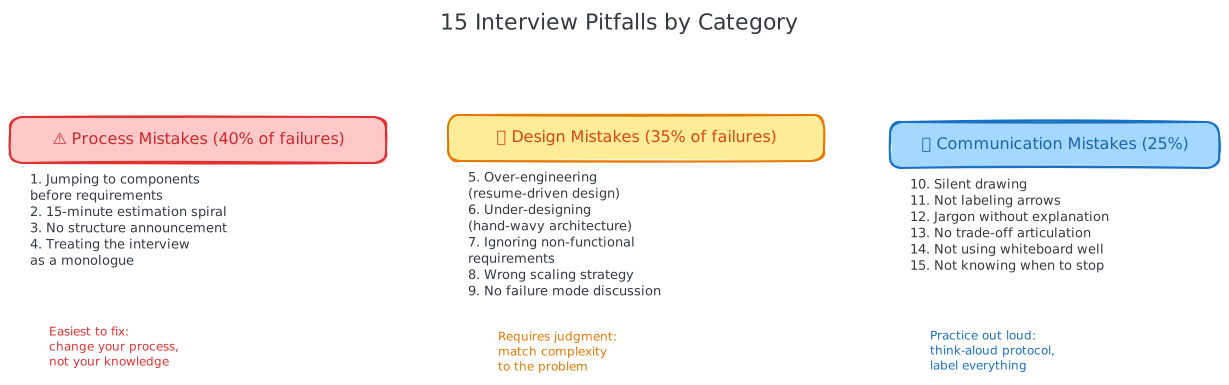
When to use this framework
Use this checklist while practicing or reviewing a design interview. It is most useful when a design feels technically plausible but the reasoning is hard to follow, the scope keeps expanding, or the architecture is more complex than the stated workload requires. Treat it as a diagnostic aid, not a script: the prompt and the interviewer can change the order.
The examples use illustrative traffic, latency, availability, and cost assumptions. Replace them with values from the prompt or with measured data; none of the figures below is a universal limit or a pass/fail threshold.
Step-by-step method: diagnose and correct a pitfall
When you notice a problem in your own answer, use this loop:
- Name the symptom. Is the issue missing scope, unclear data flow, unjustified complexity, weak communication, or an unaddressed failure mode?
- Return to the contract. Tie the correction to a functional requirement, an NFR, an API, an access pattern, or an explicit assumption.
- Make one concrete adjustment. State the changed component, flow, or explanation and why it addresses the symptom.
- Check the consequence. Mention the trade-off, remaining failure mode, or scaling boundary introduced by the adjustment.
- Invite direction and continue. Confirm the priority with the interviewer, then move to the next phase instead of redesigning everything.
The 15 pitfalls below are grouped by the part of that loop they most often affect.
Process mistakes
These are often the easiest to fix because they concern how the design discussion is structured. You do not need a new technology; you need a clearer sequence and visible assumptions.
Pitfall 1: Jumping to components before requirements
What it looks like:
"Design Twitter? OK, so we'll need a load balancer, then some app servers, a Redis cache for the timeline, Cassandra for tweets, Kafka for the feed pipeline, a CDN for images..."
The candidate is drawing boxes before asking a single question. They don't know if this is Twitter for 1M users or 1B users. They don't know if the focus is feed generation, search, or DMs. They're designing from muscle memory, not from requirements.
Why it fails:
The interviewer's first thought is: "This candidate will build what they know, not what the problem requires." That's a dangerous trait on a real team. When the interview question has an uncommon twist (offline-first, real-time collaboration, geo-distributed), this candidate will miss it entirely because they never asked.
The fix:
Spend 3-5 minutes on requirements. Propose a scope: "I'll focus on the core feed: posting tweets, generating timelines, and reading feeds. I'll leave DMs, search, and trending topics for later unless you'd prefer I cover those." Then state non-functional requirements with clearly labeled assumptions: "For this exercise, I'll assume 10M DAU, a 200ms p99 feed-latency target, and eventual consistency on the timeline."
A useful practice is to write the requirements on the board before drawing a single box. The act of writing them down forces clarity and gives the interviewer a chance to steer.
Pitfall 2: The 15-minute estimation spiral
What it looks like:
The candidate spends 12 minutes computing storage for tweets, retweets, likes, user profiles, direct messages, media, analytics events, and audit logs. They debate whether a tweet is 280 bytes or 300 bytes. They compute storage for both and present the difference.
Why it fails:
Estimation is not the interview. It's a 5-minute tool to inform the design. The candidate just burned a third of the interview on arithmetic that didn't change any design decision. The storage difference between "10 TB" and "12 TB" is zero architectural choices.
The fix:
Cap estimation at 5 minutes. Only estimate numbers that drive decisions. Ask yourself: "If this number were 2x higher, would I design differently?" If no, skip it. See Estimation for the 3-step formula.
The precision trap
"We need 4.217 TB of storage over 5 years." Nobody has ever said this in a production capacity planning meeting. The answer is "roughly 5 TB." False precision in estimation signals that you don't understand what estimation is for: enabling decisions, not winning math competitions.
Pitfall 3: No structure announcement
What it looks like:
The candidate starts talking. Sometimes about requirements, sometimes about components, sometimes about scaling. The interviewer can't predict what's coming next. There's no visible plan.
Why it fails:
Starting without announcing a structure makes the discussion harder to follow. It can leave the interviewer guessing whether the candidate has a plan or is moving between topics reactively.
The fix:
One sentence at the start: "I'll spend 5 minutes on requirements and estimates, 20 minutes on the high-level architecture, and 15 minutes diving deep into the most interesting components. I'll check in with you as we go." Done. See Approach & Structure.
Pitfall 4: Treating the interview as a monologue
What it looks like:
The candidate talks for 20 minutes straight without pausing, checking in, or asking the interviewer a question. The interviewer tries to interject ("What about...") and the candidate says "I'll get to that" and keeps going.
Why it fails:
System design interviews are collaborative. The interviewer has hints they want to give you. They have areas they want to explore. When you monologue, you prevent them from guiding you toward the aspects they care about. Worse, you miss their signals that something is wrong with your approach.
The fix:
Check in after every phase. After requirements: "Does this scope look right, or would you like me to adjust?" After the high-level design: "Before I go deeper, any component you'd like me to prioritize?" During deep dives: "I went into detail on X. Should I continue, or would you rather explore Y?"
These check-ins take little time and reduce the risk of spending a large part of the session on an area the interviewer does not need.
Design mistakes
These require technical judgment to fix, but a good first correction is often to remove complexity that is not tied to a requirement or measured bottleneck.
Pitfall 5: Over-engineering (the resume-driven design)
What it looks like:
The design includes: API Gateway, service mesh, 8 microservices, CQRS, event sourcing, Kafka, Redis, Cassandra, PostgreSQL, Elasticsearch, a CDN, and a custom ML recommendation engine. For a URL shortener.
Why it fails:
Every component adds operational cost: monitoring, debugging, deployment pipelines, and failure modes. For an illustrative URL shortener at 1K req/sec, one API server, one database, and perhaps a cache may be enough; benchmark the actual workload before adding a distributed event system.
The underlying design question is whether the engineer can make build-versus-buy and complexity decisions proportional to the workload.
The fix:
Start with the simplest architecture that meets requirements. Add complexity only when a specific number or failure requirement demands it. "I'm adding a cache because our illustrative 50K reads/sec exceeds the measured database capacity" is a justified addition. "I'm adding a cache because caches are good" is not.
The rule: every component must be justified by a requirement or an estimate. If you can't justify it in one sentence, remove it.
Pitfall 6: Under-designing (the hand-wavy architecture)
What it looks like:
"So users connect to some servers, which talk to a database. We'll cache some stuff. If it gets really big we'll shard."
No specific databases named. No data model discussed. No data flow traced. No numbers anywhere. The design is a collection of generic boxes that could describe almost any system.
Why it fails:
Generic designs show zero engineering decision-making. The interviewer can't tell if you understand why you'd choose PostgreSQL vs. Cassandra, When to shard vs. when to cache, or how data actually flows through the system.
The fix:
Name the important choices and connect them to the requirement. "PostgreSQL for order data because we need transactional invariants." "Redis for ephemeral session data because the access pattern is hot and bounded." "A durable queue for the event pipeline because we need replay and at-least-once processing." Specificity makes the decision auditable.
Pitfall 7: Ignoring non-functional requirements
What it looks like:
The candidate builds a system that handles the functional requirements (users can post, users can read feeds) but never mentions latency, availability, consistency, or scale. The design has no numbers attached to it.
Why it fails:
Two designs can look identical on a whiteboard and be completely different systems depending on non-functional requirements. A feed that tolerates 5-second staleness uses a different caching strategy than one requiring real-time updates. A system with 99.9% SLA has different redundancy than one with 99.99%.
The fix:
State non-functional requirements explicitly in Phase 2 (NFRs) and reference them during design. When adding a component, link it to an NFR: "I'm evaluating Redis against the 200ms p99 latency target on feed reads. If the measured database path is too slow or too costly for the required query volume, the cache can absorb hot reads; otherwise it is unnecessary complexity."
Pitfall 8: Wrong scaling strategy for the access pattern
What it looks like:
"Our system is read-heavy (100:1 read:write ratio), so I'll shard the database for write scalability." Or: "We have 50K writes/sec, so I'll add a cache."
Why it fails:
Caching helps reads, not writes. Sharding helps writes (and reads from the partition key), not arbitrary reads. Read replicas help reads, not writes. Each scaling technique has a specific purpose. Applying the wrong one wastes interview time and shows a gap in understanding.
The fix:
Match the scaling technique to the bottleneck:
| Bottleneck | Correct technique |
|---|---|
| Too many reads | Cache, read replicas, CDN |
| Too many writes | Sharding, write-optimized DB, async with queues |
| Too much storage | Object storage, archival, data lifecycle policies |
| Too high latency | Cache, CDN, edge computing, multi-region |
| Too low availability | Replicas, multi-AZ, multi-region, circuit breakers |
Pitfall 9: No failure mode discussion
What it looks like:
The entire design assumes everything works. No mention of what happens when Redis goes down, the database fails over, the message queue backs up, or a service throws errors.
Why it fails:
In production, every component fails. The mark of an experienced engineer is designing with failure in mind. An entire interview without mentioning failure modes tells the interviewer: "This person hasn't operated systems in production, or if they have, they don't think about resilience proactively."
The fix:
For each critical component, state the failure mode and your mitigation in one sentence:
- "If Redis goes down, we fall back to the database with degraded latency, while a bounded local cache and rate limit protect the database."
- "If the write service goes down, events remain in a durable queue if the chosen delivery policy supports that, and consumers replay them on recovery. I would state the duplicate and loss behavior explicitly."
- "If a third-party payment API has latency spikes, we use a bounded timeout and circuit breaker. After repeated failures, we reject or queue work according to the payment invariant and retry policy rather than holding request threads indefinitely."
You don't need to cover every failure. Cover the most likely failure (cache down) and the most damaging failure (database down). Two sentences each.
Communication mistakes
You can know everything and still fail if you can't communicate it.
Pitfall 10: Silent drawing
What it looks like:
The candidate draws boxes and arrows for 5 minutes without saying a word. The interviewer watches a diagram materialize with no context for why any component is there.
Why it fails:
The interviewer can't evaluate your thinking if they can't hear it. A box labelled "Redis" tells them nothing. Why Redis and not Memcached? Why a cache at all? What data is cached? What's the TTL? What's the hit rate expectation?
The fix:
Narrate while drawing. Every box gets a one-sentence justification spoken out loud: "I'm adding Redis here as our cache layer. It will store hot product data with an illustrative 5-minute TTL. Under an illustrative 95% hit-rate assumption, this absorbs 95% of 50K reads/sec and leaves about 2.5K reads/sec for the DB; I would validate both figures."
Pitfall 11: Not labeling arrows
What it looks like:
The diagram has boxes connected by arrows, but no arrow has a label. It's unclear what data flows between components, what protocol is used, or whether the connection is synchronous or asynchronous.
Why it fails:
Unlabeled arrows mean the interviewer must ask about every connection: "What does this arrow represent?" That's a waste of both your time. It also suggests you don't think about data flow, you just draw boxes.
The fix:
Every arrow gets a label: the protocol (HTTP, gRPC, TCP), the data (user profile, feed items, events), and the pattern (sync, async, streaming). Example: "REST: POST /tweet" or "Kafka: feed-events topic" or "gRPC: getUser()".
Pitfall 12: Jargon without explanation
What it looks like:
"We'll use consistent hashing with virtual nodes for the sharding strategy." No explanation of what consistent hashing is, why it's needed here, or what virtual nodes solve.
Why it fails:
Two possible interpretations: (1) you understand it deeply and forgot the interviewer needs context, or (2) you memorized the term without understanding it. The interviewer will probe to find out which, and if it's (2), trust evaporates.
The fix:
First use of any term: one-sentence definition. "Consistent hashing distributes data across nodes so that, under a balanced ring, adding or removing a node reshuffles roughly a fraction of the data rather than all of it. That's important here because our system may need to add shards as traffic grows, and a full reshuffle is costly."
Pitfall 13: No trade-off articulation
What it looks like:
"I'll use Cassandra for the feed data." No mention of what alternatives were considered, why Cassandra over PostgreSQL, or what you give up by choosing it.
Why it fails:
Every design choice has trade-offs. Cassandra gives you write throughput and horizontal scalability but gives up strong consistency and complex queries. If you don't articulate this, the interviewer doesn't know if you considered the alternatives or just picked the first thing that came to mind.
The fix:
For every major design decision: "I chose X over Y because Z. The trade-off is we lose A, but that's acceptable because B."
Example: "I'm using Cassandra instead of PostgreSQL for the feed store. Under our illustrative workload, we need 50K writes/sec for feed fanout, and the feed reads are simple key lookups by user_id, which Cassandra is designed to support. The trade-off: we lose ad-hoc SQL queries and some relational transaction semantics on feed data, but the feed contract does not require them. For user profiles, I'll keep PostgreSQL because we need relational queries and transactional invariants."
Interview tip: the trade-off formula
Memorize this sentence template: "I chose [X] over [Y] because [Z]. We give up [A], which is acceptable because [B]." Use it for every major decision. It takes 15 seconds and transforms a hand-wavy choice into an engineering decision.
Pitfall 14: Not using the whiteboard effectively
What it looks like:
Tiny, cramped diagrams in one corner. Illegible handwriting. Components drawn in random order so the data flow isn't visually clear. Or in virtual interviews: not using the shared drawing tool at all, just describing the architecture verbally.
Why it fails:
The diagram is the artifact the interviewer keeps in their notes. If it's illegible, they can't write a clear assessment. If there's no diagram, they have to reconstruct your design from memory during the debrief. Neither is good for you.
The fix:
Use the full board. Draw left-to-right or top-to-bottom, following the data flow direction. Leave space between components for labels. Use the top for requirements and estimates, the center for the architecture, and the margins for notes and trade-off decisions. For virtual interviews: use the drawing tool even if you're slow at it. A messy diagram is better than no diagram.
Pitfall 15: Not knowing when to stop
What it looks like:
The candidate keeps adding details, components, and edge cases long after making their point. The deep dive on the feed service includes threading models, JVM garbage collection tuning, and Kubernetes pod resource limits.
Why it fails:
Going too deep into implementation details signals you can't distinguish architecture from implementation. System design interviews care about which components and why, not about container orchestration settings.
The fix:
For each deep dive, stop at the architectural level. "The feed service is a stateless Go service that reads from Redis and falls back to Cassandra. It pre-fetches the next page of results to minimize latency. I'd run 10 instances behind a load balancer." That's sufficient. If the interviewer wants to go deeper, they'll ask. Don't pre-empt their questions by diving into implementation yourself.
Trade-offs, limitations, and failure modes
The checklist improves the visibility of your reasoning; it does not replace technical depth or a correct design. A highly structured answer can still be wrong if its assumptions are hidden, its access patterns are inconsistent, or its failure behavior is undefined. Conversely, a simple architecture can be the right answer when it meets the stated workload and reliability target.
The categories also overlap. Jumping to components can cause a missing requirement, which can cause the wrong data store, which can hide a failure mode. When correcting one issue, re-check the data flow and the trade-off rather than optimizing the symptom in isolation. For critical components, state the dependency, the failure behavior, the protection (timeouts, backpressure, fallback, or retry), and the recovery or replay plan.
Interview application
Pre-interview checklist
Review this about 10 minutes before an interview:
| # | Check | One-line reminder |
|---|---|---|
| 1 | Announce structure at start | "Requirements, APIs, flows, architecture, deep dives" |
| 2 | Propose scope, don't ask for it | "I'll focus on X, Y, Z. Leaving A, B out of scope." |
| 3 | Cap estimation at 5 minutes | Only compute numbers that drive decisions |
| 4 | Justify every component | "I added X because [estimate] requires it" |
| 5 | Label every arrow | Protocol + data + sync/async |
| 6 | State trade-offs at each decision | "Chose X over Y because Z. We lose A." |
| 7 | Check in after each phase | "Does this look right? What should we dive into?" |
| 8 | Cover failure modes for critical components | "If X goes down, we degrade to Y" |
| 9 | Start simple, add complexity | Don't open with microservices for an MVP |
| 10 | Let the interviewer steer deep dives | "Which area interests you most?" |
Interview tip: the mental model shift
Treat the session as a design discussion with a colleague. When you shift into "tech lead running a meeting" mode, the useful behaviors—structuring, checking in, justifying, and collaborating—become easier to apply.
Applying the checklist in interviews
The irony of this article: you won't explicitly "apply" these lessons. If you've internalized them, they'll manifest as absence of mistakes rather than presence of techniques. The interviewer won't think "great structure." They'll think "this candidate is really clear and organized." They won't think "good trade-off articulation." They'll think "this person really understands the engineering decisions."
That's the goal. The framework disappears into fluency.
30-second answer
"I start by agreeing on scope and the important NFRs, then sketch only the APIs and flows needed for the core use case. I tie each component to a requirement or estimate, label the data paths, state trade-offs and failure behavior, and check in before each deep dive. If I notice a gap, I name it, correct it locally, and continue instead of redrawing the whole system."
5-minute explanation
"I use the pitfalls as a diagnostic loop. First I announce the structure and propose an explicit in-scope and out-of-scope boundary. Then I make the scale, latency, availability, consistency, and durability assumptions visible. Before drawing a detailed architecture, I define a few API contracts and trace the critical read and write paths.
"As I add components, I explain what requirement or bottleneck each one addresses, label the protocol and data flow, and state what trade-off it introduces. I cover the most important failure modes—such as cache loss, a database failover, queue backlog, or a slow dependency—and describe the fallback or recovery behavior. I pause after each phase so the interviewer can redirect the deep dive. This keeps the answer understandable without reducing it to a memorized architecture."
The post-interview self-assessment
After every practice session or real interview, run through the 15 pitfalls and honestly ask: "Did I do any of these?" If yes, practice specifically against that pitfall next time. Most candidates have 2-3 bad habits that appear in every session. Identifying yours and fixing them is the highest-leverage preparation you can do.
Test Your Understanding
Use the following prompts to practice diagnosing a pitfall and making one concrete correction.
Recap
- The top interview failure isn't wrong architecture; it's wrong process. Announce your structure, cap estimation at 5 minutes, and check in with the interviewer after each phase.
- Over-engineering is worse than under-engineering. Start simple, add complexity only when numbers demand it.
- Every component needs a one-sentence justification tied to a requirement or estimate.
- Every design decision needs a trade-off statement: "Chose X over Y because Z. We lose A."
- Cover failure modes for critical components. Two sentences per component: what breaks and what happens.
- Narrate while designing. Silent drawing prevents the interviewer from evaluating your thinking.
- Use the framework as a set of habits: make assumptions visible, tie components to requirements, trace the data flow, and practice until the structure feels natural.
Related Concepts
- Approach & Structure - The 6-phase framework that prevents process mistakes. If you follow this structure, Pitfalls 1-4 are eliminated.
- Estimation - The technique that prevents Pitfall 2 (estimation spiral) and Pitfall 5 (over-engineering). Numbers are the filter for justified complexity.
- Capacity Planning - Translates estimates into decisions, preventing Pitfall 8 (wrong scaling strategy) and Pitfall 6 (under-designing).
- Scalability - Understanding the scaling ladder ensures you pick the right technique (Pitfall 8).
- Microservices - When to use microservices vs. a monolith. The answer is "later than you think" for most systems.
Related Articles
A 6-phase framework for any system design interview: requirements, NFRs, APIs, flows, architecture, and deep dives, with time splits for each.
The 3-step estimation formula for system design interviews: practical reference values, decision-driving math, and shortcuts that save time.
Translate estimates into infrastructure decisions: when to add a cache, when to shard, when to go multi-region, and how to present it in an interview.