CDN (Content Delivery Network)
Learn how a CDN routes users to an edge server, can reduce latency and origin load, and how to choose caching and invalidation policies.
TL;DR
- A CDN (Content Delivery Network) is a globally distributed network of edge servers—called Points of Presence (PoPs)—that can cache copies of content near users. The latency difference between a distant origin and a nearby PoP depends on geography and the network path; the numbers are workload assumptions, not guarantees.
- Without a CDN, requests for cacheable static files may travel to the origin or another upstream cache. At global scale, that distance and the repeated transfer of identical bytes can become a performance and capacity problem.
- At a 95% edge cache hit rate, the cacheable request volume reaching origin is about 20× lower than with a 0% hit rate, assuming the request mix is otherwise unchanged. The actual origin load also includes writes, misses, and non-cacheable traffic.
- Static content (CSS, JS, images, fonts, video) is a strong CDN candidate. Dynamic content (API responses, personalized pages) may still benefit from TCP connection reuse and TLS termination at the edge, even when it cannot be cached.
- The hardest CDN problem is cache invalidation: when you update your JS bundle, every PoP worldwide must serve the new version. The two solutions are time-based TTL (simple, eventually consistent) and content-addressable URLs (instant, requires build tooling).
The Problem It Solves
Imagine launch day for a news app. A front-page feature causes traffic to spike globally— engineers in Berlin, journalists in Tokyo, and readers in São Paulo all hit the "read" button at once.
Assume the single origin sits in US-East-1, Virginia. In this illustrative latency budget, the distant network path, TLS setup, request, and transfer of a 500KB JavaScript bundle sum to roughly 360ms before application rendering. Real values depend on protocol, connection reuse, content size, and the user's network.
That's before the app even renders. The important design point is that the latency budget can be spent before the framework renders a single pixel. Core Web Vitals and user experience depend on the complete page path, not on origin distance alone.
Meanwhile, your origin may receive every image request, font file, and JavaScript bundle from every user worldwide. Under an illustrative $0.09/GB egress assumption, a 2MB page weight downloaded by 50,000 users is 100GB of transfer.
That transfer alone would be $9 under the stated assumption, before database or compute costs. A single origin also creates a concentration of risk: an application or database problem can affect users globally.
A single origin serving a global audience is not solved by adding app servers alone. More application capacity can help throughput, but it does not remove the network distance or the repeated delivery of identical content.
The false assumption in 'just add more app servers'
Horizontal scaling adds compute capacity, but it does not automatically reduce the network distance between your origin and users. A user in Mumbai may still be far from a Virginia load balancer whether you run two app servers or twenty. Regional origins, edge caching, and connection reuse address different parts of that latency budget.
Without a CDN, a cacheable asset may make the full intercontinental trip on a miss. Static files that never change between requests can otherwise be fetched repeatedly from the origin instead of reused near the user.
What Is It?
A CDN is a globally distributed caching layer that sits between users and an origin server. It is a network of Points of Presence (PoPs) that intercept requests for content and serve cacheable responses from an edge location when possible.
When a user in Sydney requests a JavaScript bundle, the CDN may route the request to a nearby PoP. If the bundle is cached there, the PoP serves it without contacting the origin. The latency depends on the user's access network and the PoP path.
Treat a CDN as a design option whose value should be measured against audience geography, content cacheability, security requirements, and origin capacity.
Analogy: Think of how Amazon distributes inventory. Before Amazon Fulfillment Centers existed, every order shipped from one central warehouse. A customer in Los Angeles waited 5 days for a book warehoused in Hoboken, New Jersey.
Amazon's insight was to stock products in fulfillment centers close to customers. A CDN uses a similar mental model for digital content: the origin is the central warehouse, PoPs are fulfillment centers, and a cache hit is local delivery.
Cache misses—the case where the local fulfillment center is out of stock—still require a trip to the origin. Their effect depends on the hit rate, content popularity, and whether an origin shield is used.
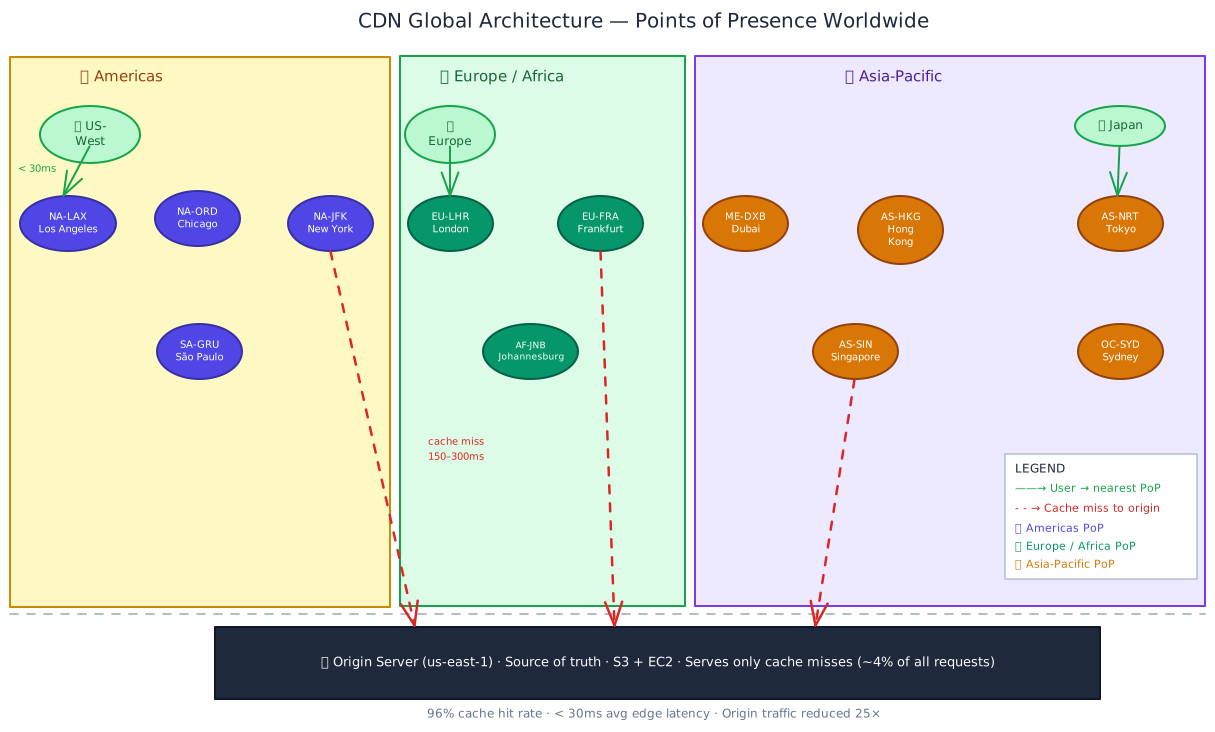
The CDN edge layer can absorb most cacheable traffic. The origin still handles misses, writes, and dynamic requests, so its capacity must be sized for that complete mix.
How It Works
Here is what happens, step by step, when a user in Tokyo requests an application's JavaScript bundle for the first time and then requests it again:
Step 1: DNS routes the user to the nearest PoP
The CDN uses a CDN-managed DNS record. When the browser resolves
assets.yourapp.com, the CDN's routing layer returns an address for a suitable PoP.
"Nearest" is an approximation based on geography, network topology, health, and policy.
For a user in Tokyo, an example target might be the AS-NRT edge node. This routing uses
one of two common mechanisms:
- GeoDNS — The DNS service estimates the client's region and returns a PoP address selected by geography, health, and policy.
- Anycast — Multiple PoPs announce the same IP address and routing selects a nearby network path. It can help with failover, but the selected PoP is topologically near, not necessarily geographically nearest.
Step 2: PoP checks its local cache
The PoP looks up the request path (/static/app.7f3c2a1b.js) in its local cache. It checks whether a cached copy exists and whether it's still within its TTL.
Cache HIT: The PoP serves the cached file directly. Latency is generally lower than an origin fetch when the PoP is nearby, but the measured value depends on the access network and distance. The origin is not contacted for that request.
Cache MISS (first request or TTL expired): The PoP does not have a fresh copy and must fetch from the origin or another configured cache tier.
Step 3: Cache miss → PoP fetches from origin
The PoP fetches the file from the origin or an origin-shield tier. This incurs the
upstream network and application latency. Once fetched, the PoP caches the response
according to the Cache-Control policy and serves the waiting user.
Step 4: All subsequent requests → cache HIT
Users whose requests map to the same cache key and PoP can receive the cached version
from AS-NRT. The origin is not contacted until the entry becomes stale, is evicted, or
is purged.
At steady state, the CDN is invisible to your origin — and that's exactly the point.
import type { Response, Request, NextFunction } from 'express';

// Production Cache-Control strategy — set on your origin server
// These headers tell the CDN how long to cache each type of content

export function cacheControlMiddleware(req: Request, res: Response, next: NextFunction) {
  const path = req.path;

  // Hashed static assets: filename contains content hash (webpack, Vite)
  // e.g., /static/app.7f3c2a1b.js — content hash changes on every build
  if (/\/static\/.*\.[0-9a-f]{6,}\.(js|css|woff2?|png|webp|svg)$/.test(path)) {
    // max-age=31536000: browsers cache for 1 year
    // immutable: browser won't send conditional request (If-None-Match) — no round-trip
    res.setHeader('Cache-Control', 'public, max-age=31536000, immutable');
    return next();
  }

  // Non-hashed static files (robots.txt, favicon.ico, sitemap.xml)
  if (/\.(ico|txt|xml)$/.test(path)) {
    // s-maxage=86400: CDN caches for 24h (overrides max-age for CDN only)
    // stale-while-revalidate=3600: CDN serves stale for 1h while fetching fresh
    res.setHeader('Cache-Control', 'public, max-age=3600, s-maxage=86400, stale-while-revalidate=3600');
    return next();
  }

  // Cacheable API responses: CDN caches, browsers don't
  // e.g., trending feed, public product catalog, config endpoint
  if (path.startsWith('/api/public/')) {
    res.setHeader(
      'Cache-Control',
      'public, max-age=0, s-maxage=60, stale-while-revalidate=300'
      // max-age=0: browsers always re-request (they see stale data immediately otherwise)
      // s-maxage=60: CDN serves this for 60s without re-fetching origin
      // stale-while-revalidate=300: CDN serves stale for up to 5 min while refreshing in background
    );
    return next();
  }

  // Private/authenticated content — must never be cached at CDN layer
  res.setHeader('Cache-Control', 'private, no-store');
  next();
}
Interview tip: cite the s-maxage vs max-age distinction
max-age controls browser caching, while s-maxage controls shared caches such as a
CDN. Setting s-maxage=60, max-age=0 is one possible policy for a public API when the
CDN may reuse a response but browsers should re-request it. Confirm that the response
is safe to share before using this pattern.
Cache-Control header reference
| Directive | Scope | What it does |
|---|---|---|
public | CDN + browser | Content is safe to cache by any intermediate cache |
private | Browser only | Only the end user's browser may cache; CDN must not |
max-age=N | Browser | Browser uses cached copy for N seconds without re-requesting |
s-maxage=N | CDN only | CDN uses cached copy for N seconds (overrides max-age for CDNs) |
no-cache | Both | Must revalidate with origin before serving (conditional GET with ETag) |
no-store | Both | Never cache — don't write to disk or memory at all |
immutable | Browser | Never send a conditional request; content identified by URL is permanent |
stale-while-revalidate=N | CDN (RFC 5861) | Serve stale for N seconds while refreshing in background (no user waits) |
stale-if-error=N | Cache-dependent | Permit a stale response for N seconds when revalidation fails; verify support and safety for the content |
s-maxage is one of the main response directives that controls shared-cache lifetime;
cache keys, cookies, authorization, Vary, and CDN policy also determine whether a
response is cached.
Key Components
| Component | Role |
|---|---|
| PoP (Point of Presence) | A CDN location that stores cached copies of content and serves an assigned user population. The number and placement of PoPs varies by provider. |
| Origin server | Your actual application server. The authoritative source. The CDN fetches from here on cache misses and for all non-cacheable content. |
| Cache-Control header | The HTTP response header from your origin that tells PoPs how long to cache, who can cache, and what to do with stale entries. The primary lever you have over CDN behaviour. |
| TTL (Time-To-Live) | The duration a PoP holds a cached response before considering it stale and re-fetching. Determined by s-maxage or max-age in your Cache-Control header. |
| CDN DNS / Anycast | The routing layer that maps a user's request to the geographically or topologically nearest PoP. GeoDNS uses client IP geolocation; Anycast uses BGP routing. |
| CDN Purge API | An API your deployment pipeline can call to invalidate specific cached paths or tags. Propagation is provider-dependent, so it helps emergency rollbacks but is not instantaneous. |
| Origin shield | An optional intermediate caching tier between PoPs and your origin. When 10 PoPs all miss simultaneously, instead of 10 requests hitting your origin, they all converge on one "shield" node that makes a single request. Reduces origin fan-out. |
| TLS termination | The CDN handles the TLS handshake at the PoP, close to the user. This can avoid a distant client-to-origin handshake; whether it improves total latency depends on connection reuse and the origin connection. |
| ETag / If-None-Match | Conditional request headers. The CDN (or browser) sends the ETag of its cached copy; the origin returns 304 Not Modified if content hasn't changed, saving bandwidth on the response body. |
| Edge functions | Serverless code that runs at the CDN PoP — e.g., Cloudflare Workers, Vercel Edge Runtime. Can dynamically modify responses, handle auth, rewrite URLs without origin round-trips. |
Types / Variations
Push CDN vs Pull CDN
The two models differ in who initiates the content transfer to PoPs.
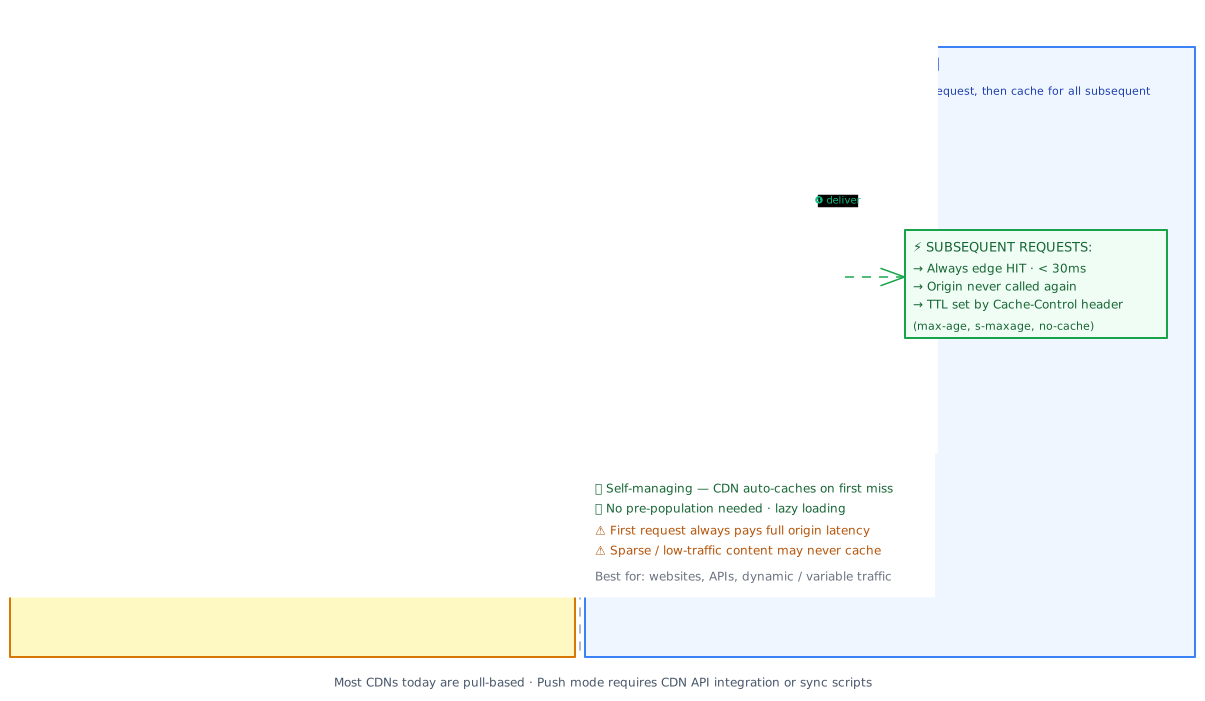
| Dimension | Push CDN | Pull CDN |
|---|---|---|
| How PoPs are populated | You upload content via CDN API at deploy time | CDN fetches from origin on first cache miss, per-PoP |
| First-request latency | Always HIT — content pre-populated | MISS on first request to any PoP → origin latency |
| Origin load | Zero reads after push completes | Origin sees 1 request per PoP per cache miss |
| Management overhead | High — must push on every content update | Low — CDN auto-manages; just set TTL headers |
| Storage cost | Pays for content at every PoP regardless of demand | Only caches content that gets requested |
| Cache invalidation | Delete via CDN API, re-push new version | Wait for TTL or call purge API |
| Best for | Large binaries, video, infrequently changing content | Websites, APIs, dynamic traffic patterns |
Many general-purpose CDNs (including Cloudflare, Fastly, and CloudFront) commonly use pull semantics by default. Push semantics are useful for specialized video delivery and asset pipelines where guaranteed warmth is worth the management cost.
Reverse-Proxy CDN vs. Object-Storage Origin
- Reverse-proxy CDN (Cloudflare, Fastly, Akamai) — can sit in front of an entire origin and may provide WAF, DDoS protection, and edge compute. Origin-IP shielding depends on the network configuration.
- Object-storage origin (Amazon CloudFront + S3, GCS + Cloud CDN) — static assets live in object storage and the CDN fronts the bucket. The application origin remains a separate path.
CDN is not just for static files
Even for dynamic requests that cannot be cached, a reverse-proxy CDN may reduce setup cost through TLS termination at the edge and connection reuse to the origin. The savings depend on the protocol, client connection behavior, origin placement, and CDN configuration; a non-cacheable request still travels to an upstream service.
Cache Invalidation
Cache invalidation at CDN scale is harder than at application-cache scale, because you're invalidating potentially 200+ PoPs simultaneously. The standard tools are:
TTL expiry (default, lazy)
Set s-maxage to a duration that keeps staleness within the content's budget. For content
updated daily, s-maxage=3600 (one hour) is an illustrative starting point, not a
universal rule.
Users in the worst case may see content up to the TTL old. This is simple and avoids a purge call, but it trades freshness for operational simplicity.
The problem: If a production incident requires an immediate fix, waiting for TTL expiry may be too slow. Pair TTL caching with a purge pipeline for content that needs emergency invalidation; TTL alone is not an emergency rollback mechanism.
Content-addressable URLs (best practice for static assets)
Embed a content hash in every static asset filename. The file /static/app.7f3c2a1b.js has the hash 7f3c2a1b derived from the file's contents. When you rebuild, the hash changes: /static/app.d3e9f1a0.js.
The new URL is unconditionally a CDN miss — PoPs don't have it yet. The old URL remains valid for users who haven't reloaded (zero breaking change).
// next.config.mjs — Next.js generates content-hashed asset URLs automatically
// Output: /_next/static/chunks/app.7f3c2a1b.js
// No manual cache-busting needed — the framework handles it.

// For your own build pipeline (e.g., esbuild custom):
import { createHash } from 'node:crypto';
import { readFileSync } from 'node:fs';

function contentHash(filePath: string): string {
  const content = readFileSync(filePath);
  return createHash('sha256').update(content).digest('hex').slice(0, 8);
}

// assets/app.js → assets/app.7f3c2a1b.js
// Cache-Control: public, max-age=31536000, immutable  ← cache forever, no purge needed
This is a strong default for build artifacts such as JavaScript, CSS, fonts, and images.
The CDN and browser can cache these files for a long period (max-age=31536000, immutable) because the URL changes whenever the content changes.
If your build pipeline does not produce content-hashed filenames, address that cache invalidation risk before tuning other CDN settings.
CDN Purge API (emergency invalidation)
Every major CDN provides an API to invalidate cached paths across all PoPs. This is what you call in your deployment pipeline for content that doesn't use content-addressable URLs.
# Cloudflare: purge a specific file after deployment
curl -X POST "https://api.cloudflare.com/client/v4/zones/${ZONE_ID}/purge_cache" \
  -H "Authorization: Bearer ${CF_API_TOKEN}" \
  -H "Content-Type: application/json" \
  --data '{"files":["https://yourapp.com/index.html","https://yourapp.com/api/config"]}'

# Cloudflare: purge by cache tag (requires Enterprise plan — much more surgical)
curl -X POST "https://api.cloudflare.com/client/v4/zones/${ZONE_ID}/purge_cache" \
  -H "Authorization: Bearer ${CF_API_TOKEN}" \
  -H "Content-Type: application/json" \
  --data '{"tags":["product-catalog","blog-posts"]}'
Purge API propagation is not instantaneous
Purge propagation is provider- and workload-dependent. During the propagation window, some users may still receive the old cached version. For a rollback, make the window part of the release plan. For compliance-critical content removal, track and verify completion before confirming deletion.
Use content-hashed URLs for static build artifacts, TTL for semi-static content, and a purge API for content that needs emergency invalidation. Document the limitations of each mechanism.
Trade-offs
| Pros | Cons |
|---|---|
| Lower latency for global users when a nearby PoP has the content | Cache invalidation complexity — stale content across many PoPs requires pipeline discipline (content-addressable URLs or purge API) |
| Origin offload proportional to the measured cache hit rate | Additional failure surface — CDN misconfiguration can serve stale content globally, or block traffic if rules are wrong |
| Potential bandwidth-cost reduction; pricing varies by provider, region, and contract | No caching benefit for non-cacheable dynamic content — personalized pages, authenticated API responses, and real-time data still go upstream |
| DDoS and WAF capacity at the edge, depending on the provider and plan | Vendor dependency — CDN becomes critical infrastructure; outage or price change can have immediate production impact |
| PoP redundancy and stale-on-error behavior can improve availability during some origin failures | Debugging difficulty — cache hits at edge hide origin errors; cache-status headers show what the user received, not necessarily what origin would send today |
| TLS termination at edge — users may get faster connection setup even when origin is distant | Vary header complexity — content negotiation (Accept-Encoding, Accept-Language) creates multiple cache variants per URL; misconfigured Vary bloats CDN storage |
The fundamental tension here is performance vs. consistency. A CDN is explicitly a caching layer between users and your authoritative data. Every performance gain — every cache hit — is served from a copy that might be milliseconds to hours behind the current state at origin. The engineering challenge is choosing, per content type, how stale is acceptable and building the expiry or invalidation mechanics to enforce that bound.
When to Use It / When to Avoid It
The value is highest when users are geographically distributed, content is shareable, or the origin needs protection from repeated reads. A CDN is an obvious candidate for global static content, but the caching and security policies still need to be scoped.
Use a CDN when:
- You serve users in multiple geographic regions and care about first-contentful-paint for each.
- Your application has a significant fraction of static or semi-static content (landing pages, documentation, product images, video).
- You're running on a cloud provider with expensive egress costs — compare the CDN's regional pricing and transfer model with the origin provider's pricing.
- You need DDoS protection without deploying and maintaining your own scrubbing infrastructure.
- Your origin would be exposed directly to the public internet — a reverse proxy CDN hides your origin's IP, significantly raising the cost of targeted attacks.
- Your
p95response time for international users is significantly worse than for users co-located with your origin.
Whether the economics justify it depends on traffic volume, hit rate, pricing, and the value of latency and origin protection. Measure those inputs rather than using a fixed threshold.
Avoid (or carefully scope) a CDN when:
- Content is personalised per user — user session data, account pages, shopping carts. These must be
Cache-Control: private, no-storeand will not benefit from CDN caching at all (though TLS termination still helps latency). - You're in the prototype stage and have no meaningful geographic or origin-capacity requirement. A CDN adds an operational layer—headers, purge pipelines, and cache-key configuration—so measure first when the benefit is unclear.
- You're serving real-time data (live sports scores, stock ticks) where any staleness is user-visible. TTL-based caching at any layer — including CDN — is actively harmful here.
- Compliance requires absolute certainty that deleted content is gone. CDN caches create a propagation window. For GDPR right-to-erasure scenarios, you need to track and confirm purge completion, not just fire-and-forget.
Put cacheable public content behind a CDN when its measured benefits justify the layer; explicitly exclude private and freshness-sensitive responses.
Real-World Examples
Netflix — Open Connect (push CDN with hardware appliances)
Netflix's Open Connect is a specialized video-delivery network with appliances co-located in or near ISP networks. Popular titles can be pre-positioned for a region, which illustrates when push semantics and dedicated hardware can be worthwhile. The trade-off is substantial hardware, peering, and operations work that is not justified for most applications.
Cloudflare — Reverse Proxy CDN as Infrastructure
Cloudflare is an example of a reverse-proxy CDN that combines caching with services such as DDoS mitigation, WAF, bot management, and edge compute. The example shows the value of edge capacity and policy enforcement, but protection depends on the provider, plan, configuration, and attack characteristics; it is not a guarantee that an origin cannot be affected.
GitHub — CDN for release archives and raw content
GitHub uses CDN-backed delivery for content such as raw files, release archives, and avatars. A popular open-source release can create geographically distributed demand for the same large artifact; caching lets the CDN absorb repeated reads instead of sending every download to the origin.
GitHub's lesson: CDN is essential for any file-hosting scenario where a single popular artifact generates massive geographically distributed simultaneous demand.
How This Shows Up in Interviews
30-second answer
"A CDN is an edge caching and delivery layer between users and the origin. I would cache public, shareable content with a cache key and TTL that match its freshness requirements, use content-hashed URLs for build assets, and keep personalized or real-time responses private. I would also discuss purge behavior, origin-shielding, and what happens if the CDN or origin is unavailable."
5-minute explanation
Start with the request path: DNS or Anycast selects an edge location, the edge checks its cache, and a miss fetches from the origin or shield before storing a response according to cache policy. Then make the policy explicit:
- Cache key and safety: identify which headers, query parameters, cookies, and authorization state vary the response.
- Freshness: set
s-maxage,stale-while-revalidate, andstale-if-errorfrom an explicit staleness budget; keep browsermax-ageseparate when needed. - Invalidation: use content-addressed URLs for immutable assets and purge or short TTLs for HTML and other mutable content.
- Capacity and failure: size the origin for misses, writes, dynamic traffic, and a CDN outage; consider an origin shield and a fallback path.
Close by explaining the trade-off: the CDN reduces repeated long-distance delivery and origin load, but adds cache consistency, privacy, vendor, and debugging concerns.
When to bring it up proactively
In an architecture that serves cacheable content to users in multiple regions, propose a CDN and state what it caches. For example: "Content-hashed static assets can be cached for a long period; the homepage can use a short shared-cache TTL; authenticated API responses stay private." Tie the choice to measured latency, hit rate, and origin load.
Don't draw a CDN box without saying what it caches
A common mistake is drawing "CDN" without stating what it caches. Be ready to say:
"Static assets with content-addressed URLs use a long TTL. A public homepage may use
s-maxage=60 and stale-while-revalidate. Authenticated API responses are
Cache-Control: private, no-store unless the authorization and cache-key model
explicitly isolates them."
Depth expected at senior/staff level:
- Distinguish
max-age(browser) froms-maxage(CDN) and explain why you'd set them differently on a public API endpoint. - Know both invalidation strategies: content-addressable URLs (filesystem-level, no purge needed) and purge API (for content that can't be URL-hashed, with propagation delay awareness).
- Explain origin shield: why adding a shield node reduces origin fan-out from "one miss per PoP" to "one miss total" and when you need it.
- Address the "origin unavailable" failure scenario:
stale-if-errormay let the CDN serve stale content during an origin brownout. If the CDN itself fails, that directive cannot help; a fallback path and origin capacity must be designed separately. - Articulate the dynamic content case: even non-cacheable requests benefit from edge TLS termination and persistent TCP keep-alive to origin.
Common follow-up questions and strong answers:
| Interviewer asks | Strong answer |
|---|---|
| "What Cache-Control headers do you set for a JavaScript bundle?" | "public, max-age=31536000, immutable when the filename has a content hash. The URL changes every build, so old entries can expire naturally and a purge is usually unnecessary." |
| "How do you invalidate CDN cache after a deployment?" | "Use content-addressed URLs for build artifacts. For HTML and other non-hashed content, use the provider's purge API or a short TTL, and account for provider-specific propagation delay." |
| "What is origin shield and when do you need it?" | "An origin shield is an intermediate cache tier between PoPs and origin. Without it, a cold deploy causes every PoP worldwide (200+ for Cloudflare) to independently miss and each fetch from origin — a thundering herd at origin level. The shield aggregates those misses so origin gets one request, not 200. I'd add origin shield when deploys cause measurable origin CPU spikes." |
| "Your CDN has a 95% hit rate. What does your origin need to handle?" | "About 5% of cacheable requests, plus all writes, misses, and non-cacheable traffic. If peak cacheable traffic is 100K req/s, that is about 5K cacheable misses under the stated mix; size for bursts and failure scenarios too." |
| "When would you not add a CDN?" | "Do not cache personalized or freshness-sensitive content. A reverse proxy may still help with TLS, DDoS controls, or connection reuse, but measure those benefits and define a fallback if the CDN is unavailable." |
Deep-Dive Questions
Test Your Understanding
Quick Recap
- A CDN is a globally distributed caching network that routes users to a suitable Point of Presence, often reducing latency for cacheable content when the edge is nearer than the origin.
- Routing commonly uses GeoDNS or Anycast. The selected PoP depends on geography, network topology, health, and policy; it is not necessarily the geographically nearest node.
s-maxagecontrols shared-cache lifetime whilemax-agecontrols browser caching. Set them independently only when the response is safe to share and the freshness policy is explicit.- The safest cache invalidation strategy is content-addressable URLs — filename contains a content hash; new builds produce new URLs, making old cache entries safely ignorable rather than a liability.
- The most dangerous failure mode is serving user-specific content without
Cache-Control: private— a single authenticated response gets cached and served to all subsequent visitors until TTL expires, leaking personal data. - Origin shield can protect an origin from cache-miss thundering herds by reducing many PoP fetches to fewer shield-to-origin requests.
- For an interview, specify what is cached, the cache key, the TTL and freshness budget, what is excluded, how invalidation works, and how origin and CDN failures are handled.
Related Concepts
- Caching — The application-level in-memory cache that sits between your app servers and your database. CDN handles the outermost layer (origin → user); application caching handles the innermost layer (DB → app server). Both apply the same hit-rate compounding math, at different layers.
- Load Balancing — CDN and load balancing are complementary: the CDN routes traffic to the nearest PoP; the load balancer distributes traffic across app server instances behind origin. Geographic routing (CDN) solves latency; instance routing (LB) solves compute capacity.
- Replication — When CDN cache hit rate is insufficient for truly global write-read consistency (e.g., your product feed changes per-region), database replication to regional clusters is the next layer — it's what actually brings authoritative data closer to users, at significantly higher operational cost.
- Rate Limiting — CDN and rate limiting complement each other for security: CDN absorbs and filters volumetric DDoS traffic at edge before it reaches your rate limiter, while your rate limiter handles application-layer abuse (credential stuffing, scraping) that CDN doesn't block.
- Scalability — CDN caching can be a major scalability lever for read-heavy workloads. A measured hit rate provides the quantitative starting point for sizing origin capacity.
Related Articles
Learn how caching eliminates redundant database reads, which strategy to choose for your write pattern, and how to design a cache layer that survives invalidation at scale.
Learn how load balancers distribute traffic across servers, which algorithms to choose, and how to design a highly-available app tier in any system design interview.
Learn how databases organize data for fast retrieval, which storage engine to choose for your workload, and how ACID transactions keep concurrent writes correct at scale.
Master how database replication scales reads, survives failures, and trades off consistency for availability. Learn replica lag, read stale data purposefully, and why your most critical business logic must run on the primary.